5G工业互联网管控系统 数据大屏源码架构与工业数据服务实践
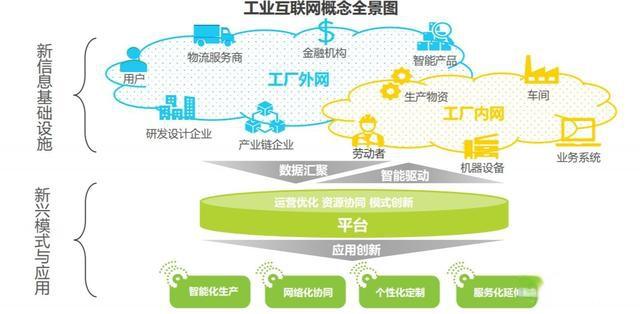
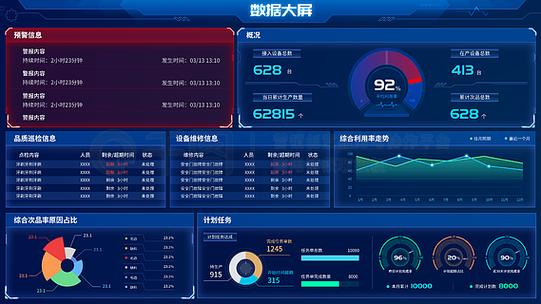
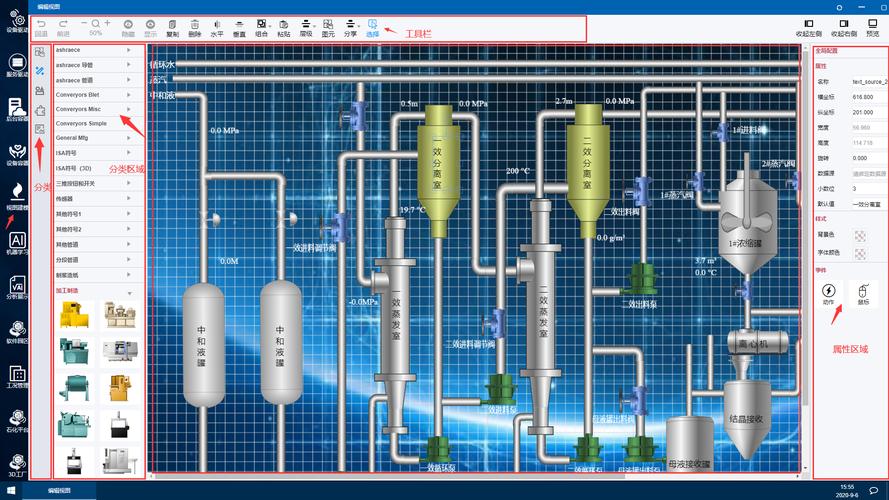
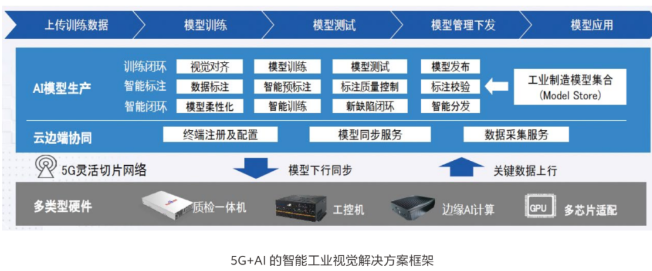
引言\n\n在智能制造与数字化转型的浪潮中,5G工业互联网管控系统正成为工厂车间、产业园区、能源矿山等场景的核心「大脑」。这套系统不仅需要实时采集设备数据、管控生产流程,还要通过数据大屏将海量信息以可视化形式呈现给决策者。与此工业互联网数据服务作为底层支撑,涵盖数据采集、传输、存储、治理与分析全链路。本文将围绕系统架构、数据大屏源码实现、工业互联网数据服务三个维度展开,为开发者与企业提供可落地的参考方案。\n\n## 一、5G工业互联网管控系统整体架构\n\n一个典型的5G工业互联网管控系统采用「端—边—云」三层协同架构,并在各层融入5G通信能力。\n\n### 1.1 端侧:设备接入与5G终端\n\n端侧包括PLC、传感器、工业摄像头、AGV小车、数控机床等设备。通过5G工业网关或内置5G模组的DTU,将Modbus、OPC UA、PROFINET等工业协议转换为MQTT、HTTP/2等互联网协议。5G的低时延(<20ms)与高可靠特性,使端侧数据可稳定上行,替代传统有线布线,尤其适合移动设备与临时产线。\n\n### 1.2 边侧:边缘计算与实时管控\n\n边缘节点部署在工厂机房或5G MEC(多接入边缘计算)平台,负责:\n\n- 协议解析与数据清洗:过滤抖动数据,做单位统一。\n- 实时规则引擎:如阈值告警、联动控制(温度过高自动降速)。\n- 本地数据缓存:网络中断时暂存数据,恢复后补传。\n- 边缘AI推理:如视觉质检、预测性维护。\n\n边缘层通常采用Docker/Kubernetes部署微服务,保证资源隔离与快速迭代。\n\n### 1.3 云侧:管控平台与数据服务\n\n云侧是系统的中枢,包含:\n\n- 设备管理:设备注册、影子、OTA升级。\n- 数据中台:时序数据库(如TDengine、InfluxDB)、关系库(PostgreSQL)、对象存储(MinIO)。\n- 业务微服务:生产调度、能耗管理、质量追溯、安防监控。\n- 数据大屏服务:通过WebSocket/SSE推送实时指标,提供可视化组件。\n- 开放API:向MES、ERP、WMS等系统输出工业互联网数据服务。\n\n5G网络切片可在云侧与运营商核心网协同,为关键业务划分专享带宽。\n\n## 二、数据大屏源码架构与工程实现\n\n数据大屏是管控系统的「颜值担当」与「决策入口」,需要高实时、高并发、自适应分辨率。以下从技术选型、目录结构、核心代码示例介绍可开源落地的架构。\n\n### 2.1 技术栈选型\n\n- 前端框架:Vue 3 + TypeScript + Vite\n- 可视化库:ECharts 5、DataV(大屏专用组件)、Three.js(3D产线)\n- 状态管理:Pinia\n- 通信:WebSocket + Axios\n- UI样式:CSS Grid、Flexbox,rem/vw适配\n- 构建部署:Nginx + Docker\n\n### 2.2 源码目录结构(可直接复用的模板)\n\n`text\ndashboard/\n├── public/\n│ └── index.html\n├── src/\n│ ├── assets/ # 图标、背景图、字体\n│ ├── components/ # 通用组件\n│ │ ├── ChartCard.vue # 图表卡片容器\n│ │ ├── RealTimeTable.vue # 实时数据表格\n│ │ └── Map3D.vue # 3D地图/产线\n│ ├── views/\n│ │ ├── production/ # 生产监控大屏\n│ │ ├── energy/ # 能耗大屏\n│ │ └── security/ # 安防大屏\n│ ├── api/\n│ │ ├── http.ts # Axios实例与拦截器\n│ │ └── ws.ts # WebSocket封装(自动重连、心跳)\n│ ├── store/\n│ │ └── device.ts # Pinia设备状态\n│ ├── utils/\n│ │ ├── screen.ts # 大屏自适应缩放\n│ │ └── format.ts # 数据格式化\n│ └── main.ts\n`\n\n### 2.3 核心源码示例\n\n#### (1) WebSocket 封装(支持断线重连、心跳)\n\n`typescript\n// src/api/ws.ts\nexport class WsClient {\n private ws: WebSocket | null = null;\n private url: string;\n private reconnectTimer: number | null = null;\n private heartbeatTimer: number | null = null;\n\n constructor(url: string) {\n this.url = url;\n this.connect();\n }\n\n private connect() {\n this.ws = new WebSocket(this.url);\n\n this.ws.onopen = () => {\n console.log('WS connected');\n this.startHeartbeat();\n };\n\n this.ws.onmessage = (ev) => {\n const data = JSON.parse(ev.data);\n // 触发全局事件或Pinia更新\n window.dispatchEvent(new CustomEvent('ws-message', { detail: data }));\n };\n\n this.ws.onclose = () => {\n console.warn('WS closed, retrying...');\n this.stopHeartbeat();\n this.reconnect();\n };\n }\n\n private reconnect() {\n if (this.reconnectTimer) return;\n this.reconnectTimer = window.setTimeout(() => {\n this.reconnectTimer = null;\n this.connect();\n }, 3000);\n }\n\n private startHeartbeat() {\n this.heartbeatTimer = window.setInterval(() => {\n if (this.ws?.readyState === WebSocket.OPEN) {\n this.ws.send(JSON.stringify({ type: 'ping' }));\n }\n }, 15000);\n }\n\n private stopHeartbeat() {\n if (this.heartbeatTimer) {\n clearInterval(this.heartbeatTimer);\n this.heartbeatTimer = null;\n }\n }\n\n send(data: any) {\n if (this.ws?.readyState === WebSocket.OPEN) {\n this.ws.send(JSON.stringify(data));\n }\n }\n}\n`\n\n#### (2) 大屏自适应缩放(基于vw/vh比例)\n\n`typescript\n// src/utils/screen.ts\nexport function useScreenFit(designWidth = 1920, designHeight = 1080) {\n const scale = () => {\n const w = window.innerWidth;\n const h = window.innerHeight;\n const scaleX = w / designWidth;\n const scaleY = h / designHeight;\n const s = Math.min(scaleX, scaleY);\n document.documentElement.style.fontSize = ${16 * s}px;\n // 或者直接对根容器做 transform: scale()\n const app = document.getElementById('dashboard-app');\n if (app) {\n app.style.width = ${designWidth}px;\n app.style.height = ${designHeight}px;\n app.style.transform = scale(${scaleX}, ${scaleY});\n app.style.transformOrigin = 'left top';\n }\n };\n window.addEventListener('resize', scale);\n scale();\n}\n`\n\n#### (3) ECharts 实时曲线组件(实时更新)\n\n`vue\n\n\n
更新时间:2026-10-10 05:26:53
如若转载,请注明出处:http://www.byrok.com/product/48.html